In May I wrote a guide for my colleagues at Netomi called Building with Claude. It was for anyone with a repetitive task, something you do every week or every month that follows the same pattern, who wanted to see if Claude could take it off their plate. No coding knowledge required. The only skill you need is the ability to describe what you want.
The guide used one workflow as its example: a monthly slide deck built from weekly release notes. Every week someone had to read the notes, pull out the features that mattered, write up the value in plain language, add them to a branded deck and keep track of what was already in it so nothing got duplicated. The details of that deck stay at work. The method is the part worth passing on.
Claude doesn’t remember
Claude doesn’t remember previous conversations, but it can read files. Every session starts fresh, so a workflow that runs week after week can’t rely on Claude’s memory. It relies on files. Instead of trying to remember what it did last week, Claude reads a tracker file kept in the folder.
That file is the memory. Claude is the engine.
This is also why a chat window isn’t enough for this kind of work. If you want an answer or a piece of content once, a chat is great. If the work involves creating or updating files over time, Claude needs a folder it can read and write. I wrote the guide for Cowork, in the Claude desktop app, which gives it one.
Three files
Three files make a workflow reliable.
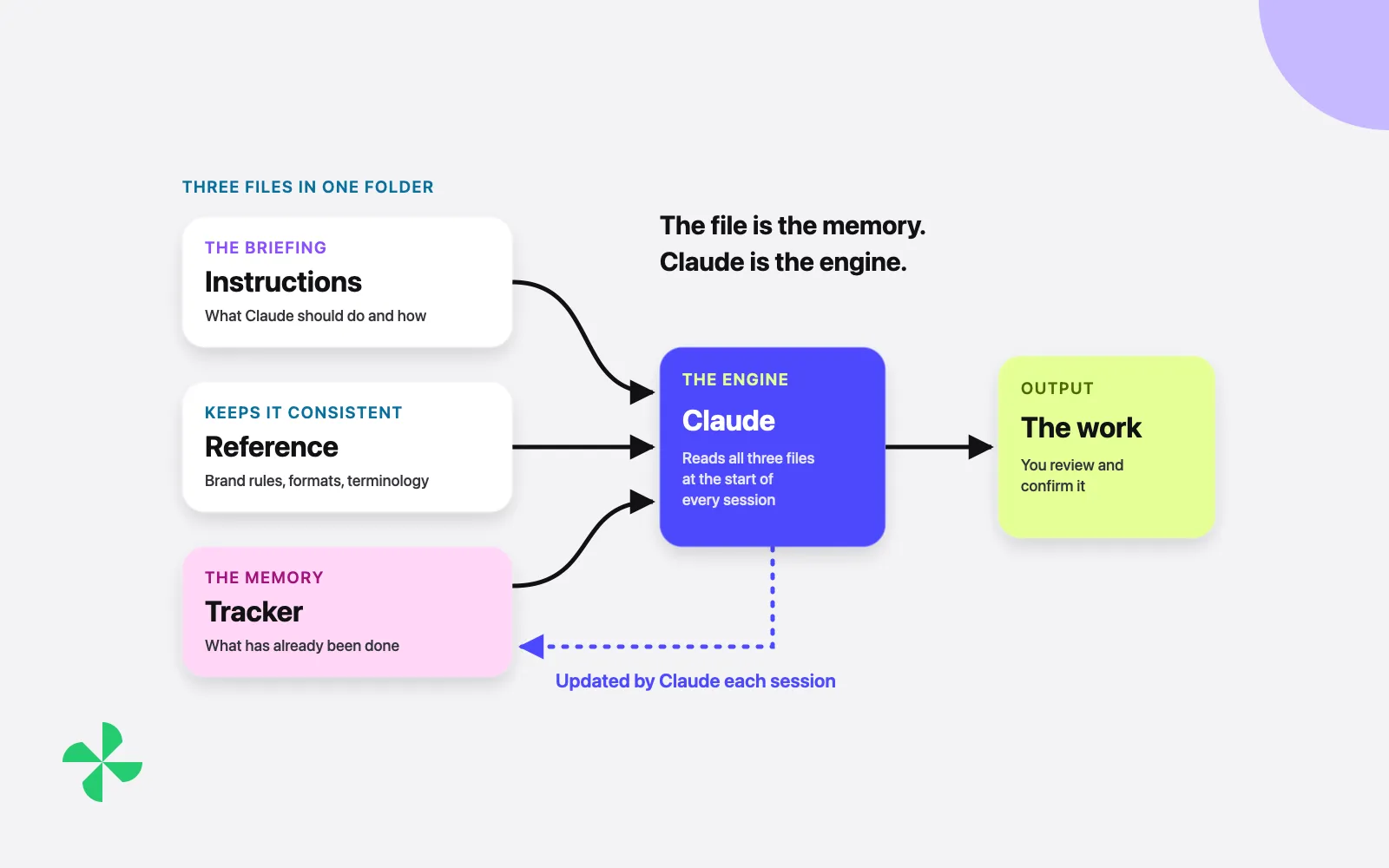
- Instructions. What Claude should do and how. Claude reads this file at the start of every session, so it works as a briefing: what the workflow is, what the rules are, what to include and leave out and what to do in edge cases.
- A tracker. What has already been done. Claude updates it each session, reads it the next time and only picks up what is new. It also makes it safe to hand the workflow to someone else partway through. They open the same folder and Claude knows where to pick up.
- A reference. Anything that needs to stay consistent, such as brand rules, formatting standards and terminology. Change that one file and every future session picks up the change.
You don’t have to write these from scratch. Ask Claude to draft them from your conversations about the workflow, then refine them together.
Start with a conversation
The workflow didn’t come from a grand plan or a technical specification. It came from a lot of back-and-forth with Claude: describing what I wanted, seeing what came out and refining it.
Start by describing what you do by hand, the way you’d explain it to a new colleague. Claude will ask questions. Let it. Most repetitive tasks follow a pattern, even if you’ve never put it into words. Something triggers the work, the steps happen in roughly the same order and the output looks roughly the same every time. The questions pull that pattern into the open.
Then ask Claude to write it up: “Based on our conversation, can you write this up as a set of instructions for Claude to follow each time I start a new session? Include the folder structure I’ll need, the workflow steps and any rules about what to include or exclude.”
The first draft will need work. That’s normal. Think of it as editing a document with a collaborator, not running a machine.
Describe the gap
When something comes out wrong, “that’s wrong” doesn’t help. Describe the gap between what you got and what you wanted: “The bullet points are too long. They should each be one line. Right now the third bullet is two sentences.” The more specific you are, the faster Claude can fix it.
A few more habits from the guide:
- Say what you want and what the result should look like. The how is Claude’s job.
- Say who the audience is. If you don’t, Claude will guess.
- Before Claude changes a file, ask it to show you what it plans to do.
- If a choice surprises you, ask why. The answer either makes sense or shows you a gap in the instructions.
Fix the instruction
When the output is wrong, the tempting shortcut is to correct it and move on. Resist that for anything you plan to run regularly. Fix only the output and the same problem comes back next session. Fix the instruction that caused it and the problem goes away for good.
The same goes for edge cases, the situations the first instructions didn’t anticipate. Handle each one in the session, then add a rule so it is handled next time. Over a few months the instructions come to cover almost every situation.
That isn’t a sign the workflow was built badly. It’s a sign it is being used. The goal is not a perfect system on day one. The goal is a system that gets a little better each time you run it.
Pick one thing
Good candidates are tasks you do on a schedule, where the inputs are files or documents and the output looks similar every time. Thirty minutes to two hours of the same steps is about right.
You don’t need to plan a whole workflow before you start. Pick one thing and start talking.