Checkout is the final step before a customer completes their purchase. How you configure checkout settings has a big impact on conversion rates, meaning the percentage of visitors who actually complete a purchase.
Why checkout matters
Checkout configuration is essential because:
| Consideration | Why it matters |
|---|---|
| Checkout is the final step | If checkout doesn’t work smoothly, customers abandon their carts. |
| Mobile checkout | A large portion of store visitors are on mobile devices. Checkout must work well on phones. |
| Customer accounts | Requiring customers to create accounts can reduce conversions. |
| Checkout fields | Too many required fields can cause customers to abandon their purchase. |
Note
Shopify is moving toward One-Page Checkout as the default. This guidance reflects the current single-page checkout flow.
Checkout customization options
Checkout settings let you control how customers complete their purchase. The main areas you can customize are customer accounts, contact method, information fields and order processing.
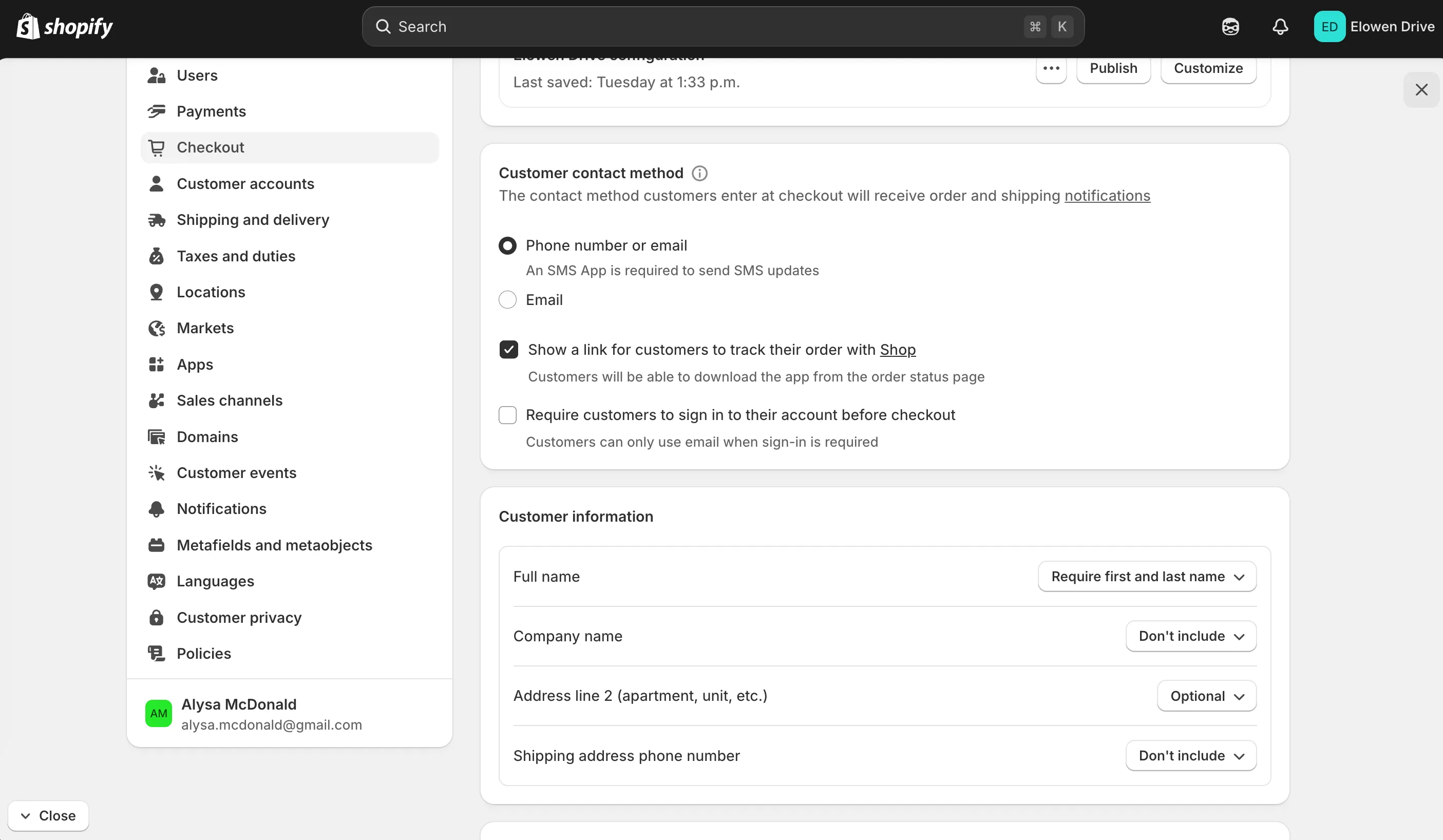
Accessing checkout settings
To review or change these settings:
- In your Shopify admin, go to Settings → Checkout.
This section controls how customers receive order and shipping notifications.
| Setting | Recommendation for most new stores |
|---|---|
| Phone number or email | Recommended: gives customers more flexibility |
| Email only | Simpler but less flexible |
| Show a link for customers to track their order with Shop | Keep enabled: improves customer experience |
| Require customers to sign in before checkout | Usually disabled: requiring accounts reduces conversions |
Customer information fields
These settings control what information customers are asked to provide during checkout.
| Field | Recommendation |
|---|---|
| Full name | Keep required (first and last name) |
| Company name | Don’t include (recommended for most stores) |
| Address line 2 (apartment, unit, etc.) | Optional (good default) |
| Shipping address phone number | Don’t include (unless needed for delivery) |